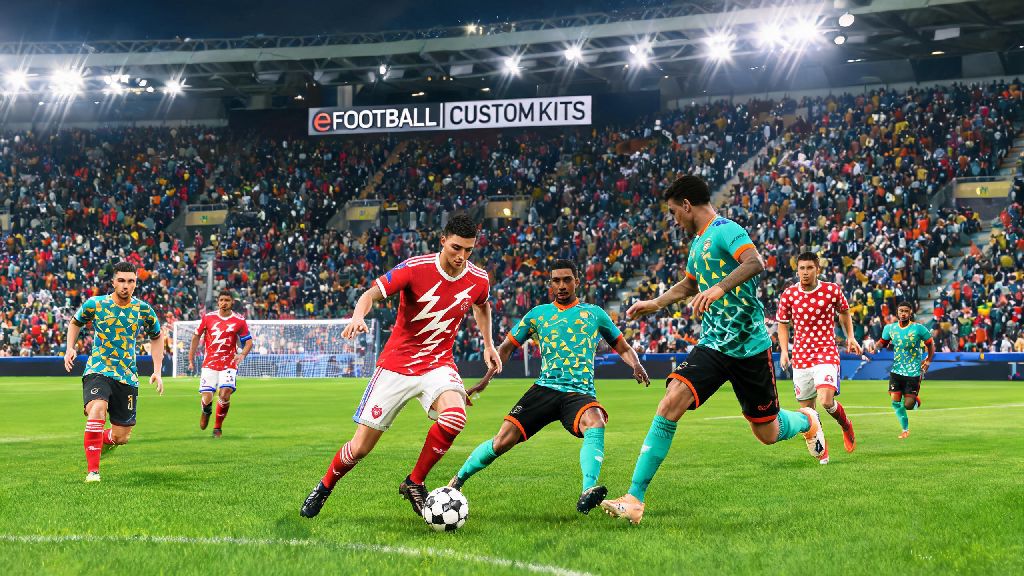
If you’ve ever queued up for a casual eFootball match only to realize you and your opponent are wearing nearly identical kits, you know how frustrating it can be to tell your wingers apart mid-fast break. Small quality of life tweaks make a huge difference to your gameplay experience, and knowing how to change team kit in eFootball is one of the first skills every new player should pick up. You don’t need to spend real money or grind for rare rewards to access most basic kit swaps, and the whole process takes less than 30 seconds once you know where to look. Even if you only play offline career mode, customizing your kit can make each season feel fresh and more personal.
How to Change Team Kit in eFootball for Offline Friendly and Career Matches
For offline game modes, the process is straightforward and works the same across all console and PC versions of the game. First, select the game mode you want to play, whether that’s a one-off friendly against AI, a Master League career match, or a local co-op game with a friend sitting next to you. When you reach the team selection screen, hover over your chosen team and press the menu button for your platform: square on PlayStation, X on Xbox, or right click on PC to open the team customization dropdown.
From the dropdown menu, select the “Kit” option to see all available designs for your selected team. Most official clubs will have at least a home, away, and third kit available by default, and many retro and special edition kits are added for free with regular game updates. You can preview each kit before confirming to make sure it doesn’t clash with your opponent’s chosen design, which is especially important for teams that have similar home color schemes like Manchester United and Liverpool.
If you play Master League regularly, you can set a default kit for both home and away matches in your team settings menu, so you won’t have to manually swap it every time you load into a new fixture. This small time save adds up over a full 38-game league season, and you can still override the default for specific matches if you want to wear a special retro kit for a rival game.
Unlocking and Using Custom, Licensed Kits in Online eFootball Modes
Offline matches give you full freedom to pick any kit you have unlocked, but online modes have a few more restrictions to keep matches fair for everyone. For Dream Team ranked matches, you’ll only be able to use kits you’ve officially unlocked through season pass rewards, limited-time event challenges, or optional purchases from the in-game store. Custom fan-made kits are only allowed in private online lobbies, so you won’t be able to use your custom national team design in ranked play to avoid issues with inappropriate content or unfair visual advantages.
If you're waiting for your friend to join your private lobby so you can test out your new custom kit, it's normal to look for a quick casual game to pass the time. Lots of eFootball players keep casual mobile games installed for these short gaps between matches, so it's not uncommon to see people loading up Rummy Ludo for a 2-minute round while they wait for their lobby to fill up. It’s a low-stakes way to pass 60 seconds without having to load up another full competitive game.
Once your lobby is full, you can change your kit the same way you would for offline matches: head to the team select screen, open the customization menu, and pick from your unlocked kit options. Keep in mind that if you’re playing cross-platform, custom user-created kits won’t show up for players on other consoles unless they’ve already downloaded the same design, so stick to official licensed kits if you want everyone in the lobby to see your chosen look.
Troubleshooting Common Kit Change Issues in eFootball
Even if you follow the steps correctly, you might run into a few common issues when trying to swap your kit, especially in online modes. Most of these issues have simple fixes that don’t require any technical knowledge:
If you run into an issue that isn’t listed above, try restarting your game first, as most temporary glitches with kit loading are fixed with a quick reboot. If the problem persists, check the official eFootball social media accounts to see if there’s a known bug with kit customization in the latest game update.
Pro Tips to Make Your Custom Kit Stand Out in Casual Play
If you make your own custom kits for private lobbies, there are a few small tweaks you can make to improve both the look and functionality of your design. First, use high contrast colors for the player numbers and names on the back of the kit, so you can easily spot your players during fast counter attacks or chaotic box scrambles. You can match your kit to your in-game playstyle for a fun personal touch: if you play a fast, counter-attacking style, pick bright, bold colors that pop against the green pitch, so you can track your wingers easier when they make runs down the flank.
You don’t have to design kits from scratch if you don’t have graphic design skills. Many active eFootball communities share free custom kit designs for popular clubs, national teams, and even fictional teams from popular sports anime, so you can download and import these designs directly into your game for free. Just make sure you only download designs from trusted community groups to avoid loading malicious files onto your device.
Avoid using overly busy patterns on your kit if you play competitive private lobbies, as they can make it harder to distinguish your players from the opponent’s during fast-paced play. Simple, clean designs with clear color blocking work best for competitive play, and you can always use more outlandish designs for fun casual matches with friends.
At the end of the day, taking a few minutes to learn how to change team kit in eFootball adds a small but meaningful layer of personalization to every match you play. Whether you're rocking your favorite club's 90s retro kit for a casual match with friends, or testing out a custom design you made yourself, swapping your kit makes the game feel more tailored to your preferences. Don't overcomplicate it, start with the basic default kits first, then unlock more designs as you complete in-game challenges. It's a small tweak that makes a big difference in how much you enjoy your time on the pitch.